A practical guide to agentic AI, from simple workflows to production-ready systems.
1. Why everyone is talking about AI agents
AI agents have moved quickly from research demos and developer tools into mainstream business conversations. And for good reason: agentic systems can now handle everything from simple repeatable tasks to complex multi-step workflows. The field is still early, but the direction is clear: we are moving from asking models for one-off answers to designing systems that can plan, use tools, check their work, and improve over time.
This guide is not about treating agents as magic. It is about understanding the design principles underneath them: iteration, tools, memory, evaluation, guardrails, orchestration, cost, latency, observability, and security. Once you see those pieces clearly, "AI agents" becomes less of a buzzword and more of a practical way to design intelligent workflows.
By the end, you should be able to look at a workflow and decide whether it needs a simple prompt, a deterministic automation, a single agent, or a multi-agent system, and what tradeoffs come with each choice.
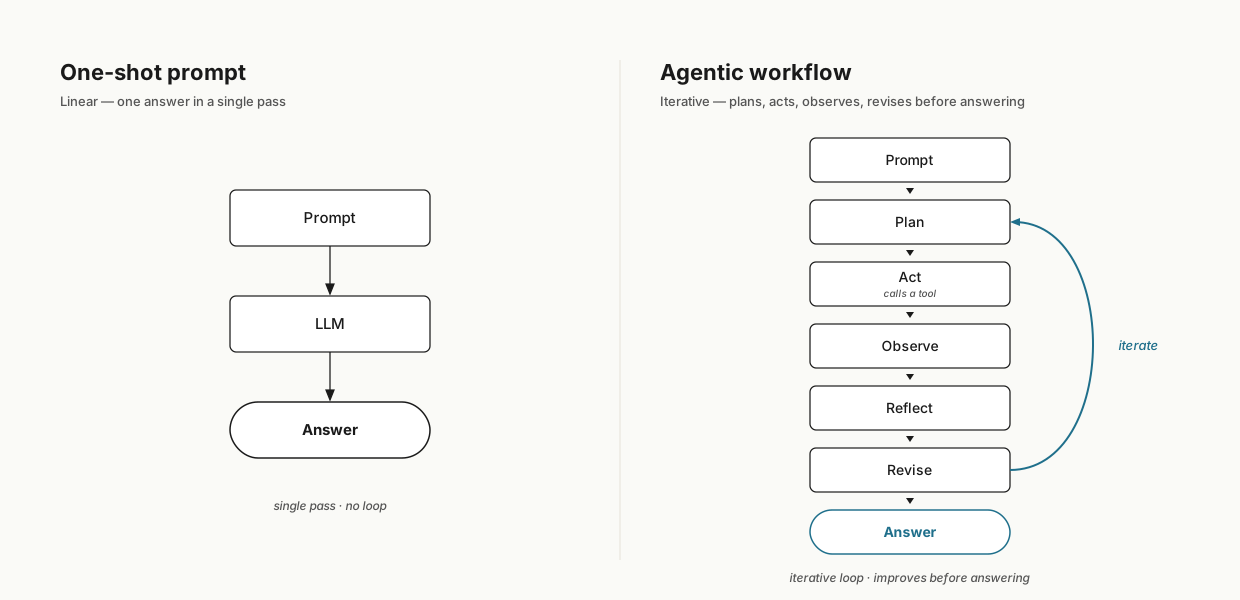
A useful place to start is with an analogy. If you wanted to write an essay using a traditional one-shot LLM prompt, you'd ask a chat assistant something like, "Write me an essay on how to get started in the gym," and the model would produce the whole thing in a single linear pass. That isn't how a person writes. A person plans, outlines, does some research, drafts something messy, reads it over, revises, and revises again. Agentic AI does the second thing: instead of asking the model to do everything in one go, you let it work iteratively, the way a human would.
2. What an AI agent actually is
Stick with the essay example. An agent tackles it in stages. First it builds an outline — main points and order. Then it figures out what information the outline needs and goes and gets it: search the web, pull from APIs, download relevant sources. With that material in hand, it drafts the essay. Then — the part that really matters — it reflects on its own work and revises: tightens weak arguments, fills in missing information, improves flow.
This loop has a name: the ReAct loop. The model reasons about what to do next, acts (often by calling a tool), observes the result, and then either gives an answer or loops back to reason again. Each pass adds depth — stronger reasoning, fewer hallucinations, better organisation. All the things that get lost in a single shot.

This iterative approach suits anywhere you need careful, accurate work with proper sourcing — legal research where you cite specific cases, healthcare documentation, customer support that has to look up account details before responding. The price you pay is complexity: agents have more moving parts than a single prompt.
3. When agents are worth using
Not every task should be agentic. The simplest agent is something like extracting key fields from invoices and saving them to a database — a clear, repeatable process. A mid-complexity task is responding to customer emails: the agent looks up the order, checks the customer record, and drafts a response for human review. A level higher is a full customer-service agent handling questions like "Do you have any blue jeans in stock?" or "How do I return this purchase?" — for a return, the agent has to verify the purchase, check the policy, confirm a return is allowed, and walk through the process step by step. It has to figure out the steps, not follow a script.
A practical way to decide whether an agent is the right tool is a 2×2 matrix with two axes: complexity and precision. Some tasks have high complexity and demand high precision — filling out tax forms, for example. Others are complex but tolerate imperfection, like writing and checking summaries of lecture notes. The biggest value usually comes from high-complexity work, and the fastest early wins tend to be on the lower-precision side. That's why high-complexity, low-precision is often the smart starting quadrant: you get the leverage of automating something tricky without being blocked by needing perfect output every time.
This is a useful antidote to AI hype. The question is not "could an agent do this?" The better question is "how much complexity does this task contain, and how costly is it when the agent is wrong?"
The summary rule: agents shine when tasks need iteration, research, or multi-step reasoning. Use agents when the workflow needs judgment between steps. It often makes sense to start with complex tasks that can tolerate slightly less than perfect accuracy.
4. How agents are built
The autonomy spectrum
Once you've decided an agent makes sense, the first design choice is how much autonomy to give it. Think of this as a spectrum.
A traditional automation follows a fixed path. An agentic system still needs structure, but it can decide which step or tool comes next based on what it observes. That difference matters: the more freedom you give the model, the more useful it can become, but the more you need evaluation, permissions, and guardrails.
On one end you have scripted agents, where you hardcode every step. For the essay example, that might be: first generate search terms, then call web search, then fetch pages, then write the essay. The model's only job is generating the actual text — you've decided everything else. Deterministic, predictable, easy to control.
On the other end you have highly autonomous agents. The LLM decides whether to search the web, read sites, or pull research papers. It may decide how many pages to fetch, whether to convert PDFs, whether to reflect and revise. It might even write new functions and run them. More powerful, but harder to predict and harder to control.
In practice, most real-world agents sit in the middle and are semi-autonomous: the agent picks from a set of tools you've defined, and makes decisions inside guardrails you've set.
Context engineering
How does an agent know what tools are available, or how to make decisions? Through what's called context engineering — deciding what information the agent has. That includes the background of the task, the agent's role, memory of past actions, and the available tools. Put together, the context steers a non-deterministic model toward consistent, high-quality outputs. The practical foundation of agent intelligence isn't the model alone — it's how you engineer the context around it.
In practice, many agent failures are not model failures. They are context failures: the model did not know the goal, the available tools, the constraints, the user's preferences, or what happened earlier in the task.

Task decomposition
Once the agent has its context, you need to define the tasks it will do. Figuring out those tasks is arguably the most important skill in agent building.
The recipe is: start with how you do the task. For each step, ask: can an LLM do this? If the answer is no, split it smaller until it is. For the essay agent that produces something like: outline (LLM), generate search terms (LLM), call a search API (tool), fetch pages (tool), write a draft using those sources (LLM), self-critique to find gaps (LLM), revise (LLM). Each step is small, checkable, and clear. When the output isn't good enough, you know exactly which step to improve.
A worked example: a Weekly Learning Assistant
To make this concrete, imagine you wanted to build a Weekly Learning Assistant. The user gives it a topic — say, "vector databases" — and it returns a personalised study plan they can work through over the next seven days. Input: a topic. Output: a readable plan listing the best resources in the right order.
Where does the agent system come in? Run the recipe from the previous section: list the steps, then ask whether each one is something an LLM or a tool can actually do. A clean first split looks like this:
- Source finder. Search the web (and any reference material you've connected) for high-quality content on the topic.
- Curator. Read those sources, filter for quality and relevance, and pick the most useful ones.
- Planner. Sequence the chosen material into a study plan that builds from basics to advanced.
- Formatter. Turn the plan into a clean, readable document the user can actually follow.
Each role is small enough that an LLM, with the right tools, can do it. If the final plan comes out wrong, you know exactly where to look — generic search queries, weak filtering, bad sequencing, or messy formatting — and you can rerun any single step without redoing the others.
The takeaway isn't the assistant itself. It's that the moment you decompose a workflow into named roles with clear inputs and outputs, the agent system becomes inspectable: you can see what each role is doing, evaluate it, and improve it independently. That is the design pattern that the rest of this guide builds on.
5. How to evaluate and improve agent systems
Building an agent that runs is the easy part. Knowing whether it actually works — and improving it from there — is what separates hobbyists from professionals.
Evaluating: components and end-to-end
Sometimes evaluation is easy: if the customer-service chatbot was asked whether an item is in stock, did it answer correctly? Yes or no.
Sometimes it isn't. How do you measure whether an essay is actually good? One approach is to use a second LLM as a judge — rate each essay 1–5 against a consistent rubric. You evaluate at two levels: component-level (each step is doing its job) and end-to-end (the final output is high quality).
When the system misbehaves, examine the trace — the chain of intermediate steps the agent took: the search queries it wrote, the drafts it produced, its thinking steps, its tool calls. The trace is the agent's working-out, recorded in order. Reading through traces, you'll often see patterns: queries that are too generic, or revision steps that aren't actually getting the critique passed to them. Those observations become your next evals or your next fixes. Don't wait for a perfect evaluation system before you start improving the system; get something working, observe it, and iterate.
Memory vs knowledge
Two things people often confuse.
In plain English: knowledge is the library the agent can consult; memory is the notebook it updates as it learns from experience.
Memory is dynamic. It's what an agent remembers about what worked, what failed, and what to do differently next time. Agents can have short-term memory (notes they write while doing a task — and in multi-agent systems, other agents can read those notes) and long-term memory (lessons stored after a run, loaded next time, similar to supervised feedback). Memory updates each run, and is how an agent improves itself.
Knowledge is static. It's reference material loaded up front — PDFs, CSVs, documentation, or a database the agent can query. You give it once, and the agent pulls from that library whenever it needs to cite something accurately.
Guardrails
Once an agent has its tasks, knowledge, and memory, you might be tempted to let it loose. Don't. LLMs are non-deterministic — they sometimes produce factually wrong output, or output in the wrong format. A guardrail is a quality gate between what the agent says is done and what actually ships. There are three approaches, and most production systems use at least two:
- Deterministic checks. For things like output format and length, a simple code snippet works. Fast, cheap, prefer this whenever possible.
- LLM-as-judge. For nuanced things like factual consistency or tone, use another LLM. If the judge says no, the failure feedback goes back to the original agent, which revises and tries again.
- Human approval. For the highest-stakes work, the agent stops and asks for sign-off. The human approves, rejects, or sends feedback for another pass. Use human approval where mistakes are expensive.
6. Reflection, tools, planning, and multi-agent systems
There are four design patterns that reliably boost the quality and capability of an agent system.
Reflection
Reflection means the model doesn't stop at the first draft. It produces something, critiques it, and rewrites it if needed. That second pass — guided by a prompt asking it to fix anything wrong — almost always improves the result.
Picture a customer-service email. The first draft is polite but vague: a generic apology, no specifics, no clear next step. A reflection pass that asks "is this clear, specific, and on-brand?" turns it into something tighter — it references the actual order, names the concrete next step, and lands the right tone. Same content, sharper version.
Reflection gets really powerful with code, because you can incorporate external feedback. Write the code, have a critic agent review it, then actually run it. Errors, test results, and outputs feed back into the model, which uses that concrete information to produce a much better second pass.
Reflection is especially useful for structured outputs (JSON), procedural instructions (like the steps to brew coffee), creative work, and long-form writing. It works best when you can incorporate external feedback — running a schema validator on JSON, or checking citations in a research task. The drawback: multiple passes mean more latency and cost. Always test with and without to confirm it's helping.
Tool use
The core idea: you give the LLM a menu of functions it can call — web search, database queries, code execution, calendar access, whatever your application needs — and the model decides when and which tools to use.
This matters because an LLM by itself is just a text generator.
It doesn't know what time it is, doesn't know your company's
sales data, can't execute code, can't compute exact answers.
With tools, it can do all of those. Use tools when the model
needs information or action beyond text generation. Ask "What
time is it?" — the model calls get_current_time,
gets back 3:20 PM, and answers.
When you give the model multiple tools, it can
chain them. A calendar assistant exposes
check_calendar, make_appointment, and
delete_appointment. The user says "Schedule a
meeting with Alice this week." The model thinks through the
steps — check the calendar for availability, find an open slot,
call make_appointment with Alice at that time,
confirm back to the user. The model is choosing the next tool
based on the previous tool's output. Not a fixed pipeline —
actually dynamic.
How does an LLM, which only generates text, call a function? It
doesn't, technically. It requests a function call. The
loop: user sends a prompt; the LLM decides if it needs a tool;
if it does, it outputs a special request (e.g., "call
get_current_time with timezone Pacific/Auckland");
your code runs the function and feeds the result back as new
context; the LLM uses it to finish its answer or to request
another tool. The LLM requests; your code executes.

For this to work, every tool needs a consistent definition with two parts:
-
The interface — tool name, plain-English
description of when to use it, typed input schema. (For
example:
read_website_content— fetch and return the text of a web page — input: one URL string.) This is what the agent sees. - The implementation — the actual code: database queries, retries, throttling, parsing. Hidden from the agent.
Good tools also handle errors and self-recover, respect rate limits, cache results for identical inputs to reduce latency, cost, and external API load, and offer async support so other agents can keep working while a long call completes. Build tools like products — with versioning, documentation, and tests — and maintain an internal registry of vetted tools with docs, versions, and ownership.
Planning
Reflection improves a single output. Tools let the agent reach into the world. Planning is about letting the agent decide what to do and in what order, instead of hardcoding the sequence.
Imagine a customer-service agent for a retail store. You could hardcode every flow: if it's a pricing question, do X; if it's a return, do Y; if it's inventory, do Z. But what about questions you didn't anticipate, or the same question that needs different steps depending on context?
With planning, you give the agent a toolkit —
get_item_descriptions,
check_inventory, get_item_price,
process_return — and let it figure out which tools
to use and when. The loop: prompt the agent to produce a
step-by-step plan, execute it step by step (the LLM picks the
right tool, you run it, feed the result back), and repeat until
done. Plan–act–observe–continue, with your tools.
Concrete example. A user asks, "Are there any round sunglasses in stock for under $100?" The agent plans:
-
Use
get_item_descriptionsto find round frames. - Run
check_inventoryon that list. -
Call
get_item_priceon the in-stock items and filter for under $100. - Compose the answer.
You didn't pre-define that exact recipe. The LLM picked it from the available tools. Now a different question: "I want to return the gold-frame sunglasses I bought, not the metal ones." The plan changes completely:
- Identify the user's purchase.
- Match the gold-frame product.
- Process the item return.
- Confirm the outcome.
It's helpful to have the model output its plan as structured JSON, or to let it write code that encodes the entire plan. Planning increases autonomy, which means it also increases unpredictability. You need guardrails on permissions, validation on tool calls, and disciplined passing of one step's output into the next.
One of the strongest use cases for planning is agentic coding systems. The model breaks programming tasks into steps and works through them one by one. For other domains, planning works, but it's harder to control because you don't know in advance what plan the model will create. The tooling and guardrails are improving fast, so adoption is growing.
Multi-agent collaboration
What if you have a system that needs to do lots of different things, possibly at the same time? Real teams don't hire one super-generalist; they hire specialists who hand work off to each other. Multi-agent systems borrow that mindset: each agent has a clear role and focuses on what it's good at. Output improves because every step has its own specialist. Other advantages: no single agent has to carry a giant context window; you can mix cheaper, faster models for high-volume simple tasks and reserve larger ones for strategy, delicate replies, or long-form writing; you can parallelise work; and you can show users which agent is working on what.
When not to use multi-agent systems: simple tasks. They add a whole new layer of complexity. Two agents writing the same file can cause resource conflicts; there's communication overhead, task dependencies, API rate limits, and failure-handling decisions (if one agent fails, do the others keep going or roll back?), and the question of how to combine multiple outputs into one coherent result. It's manageable, but it has to be designed for — robust orchestration, good error handling, and clear communication protocols. The decision rule: use multi-agent systems when specialisation helps more than coordination hurts.
Take a marketing brochure as a worked example. The first step is defining agents by role, each with only the tools it needs:
- A researcher agent that finds market trends and competitor moves — tools like web search, retrieval, note-taking.
- A graphic designer agent that creates charts and visual assets — image generation, image manipulation, code execution to plot charts.
- A writer agent that turns findings and assets into final copy — could be a plain LLM with no external tools.
You implement each agent by prompting it with its role ("you are a research agent specialising in market analysis") and giving it only the tools it should have.
Once the agents exist, decide how they communicate. Four main patterns, simplest to most complex:
- Sequential. Each agent finishes its work and hands off to the next. For the brochure: researcher → designer → writer. Like an assembly line. Easy to debug, predictable timing and cost. Start here. It might be all you need.
- Parallel. When steps don't depend on each other, run them at the same time. Researcher and designer work simultaneously on independent parts; the writer combines outputs. Faster, but adds coordination complexity.
- Manager + specialists. A manager agent plans and coordinates; the specialists do the work and report back to the manager, not to each other. The manager can reorder steps, skip what isn't needed, and ask agents to redo work. More adaptable than a linear flow without being chaotic. This is probably the most common pattern in production today.
- Deeper hierarchies. Some agents manage their own sub-agents — the researcher might orchestrate a web-researcher and a fact-checker; the writer might supervise a style-checker and a citation-checker. Useful for very complex tasks; adds chaos.
There's also an all-to-all model where any agent can message any other at any time. Outputs vary wildly. Rare in production because it's hard to predict or control. Reserve it for brainstorming, creative work, or low-stakes tasks like generating ad-copy variations where one bad run is fine.
Two pitfalls keep showing up. Redundant work: multiple agents repeat the same searches or call the same tools — fix by tightening task scopes and division of labour. Unnecessary serialisation: you chain steps that could run concurrently — identify the truly independent tasks, run them asynchronously, and route only the context the next step needs. Start with the simplest coordination method that works, and add complexity only as needed.
Whatever pattern you pick, four practices show up across well-designed multi-agent systems:
- Define interfaces, not vibes. Each agent needs a clear schema for inputs and outputs — fields, types, IDs, references. Handoffs break more often than the models do. If the researcher returns an unstructured blob the designer can't parse, the whole system fails.
- Scope tools per agent. Least-privilege. Helps with security and makes the system easier to reason about, audit, and debug.
- Log the trace. Keep per-step artefacts: each agent's plan, prompts, tool calls, and results. When something breaks, the trace makes error analysis fast.
- Evaluate components and end-to-end. Component evals tell you whether the research is relevant, the images are high quality, the copy is on tone. End-to-end evals tell you whether the final brochure is good. If end-to-end fails but components look fine, it's a handoff or integration issue.
A multi-agent example: a content prototype
Picture a creator or a small marketing team that wants to turn a stack of internal material — book notes, ideas, brand guidelines — into short scripts for social video. The kind of multi-agent prototype you might sketch on a whiteboard looks like this:
- Inputs. A library of notes, ideas, and brand documents, uploaded once.
- Search by meaning. A semantic search index over the library — search by meaning, not exact keywords — so a query about "staying focused" pulls notes about attention or distraction even if those words aren't in the question.
- Idea agent. Searches the index and proposes video ideas grounded in the source material.
- Writer agent. Turns a chosen idea into a 30–60 second script with a hook, the value, and a call-to-action.
- Brand agent. Checks the draft against a living set of brand guidelines and flags anything off-tone.
- Human approval. The creator edits, approves, or rejects each script before it ships.
- Feedback agent. Watches what the human accepts versus rejects and updates the brand guidelines accordingly, so the system gets better over time.
This is a prototype pattern, not a production system. It saves obvious hours, but it would still need proper evaluation, error handling, and guardrails before it could be deployed at scale. What it shows is the shape: specialised roles, a search index built around meaning, a human in the loop for quality, and a feedback step that lets the system learn.
7. From prototype to production
A prototype can impress you once. A production system has to behave well repeatedly, under varied inputs, with real users, real costs, real failures, and real consequences.
Personal hacks are one thing; running an agent system in front of real users at scale is another. The techniques that took you from zero to prototype won't take you from prototype to production. Production needs different tools, mindsets, and discipline.
Advanced decomposition
Task decomposition gets more complex with multi-agent systems. Four main patterns:
- Functional — split by technical domain or expertise. A full-stack feature: front-end, back-end, database, API. Each domain gets its own specialised agent. This is what we've been using in the brochure example.
- Spatial — split by file or directory. Powerful for large codebases. A refactor updating every API endpoint to a new authentication system across dozens of files: agents work on separate parts of the codebase. Minimises conflicts and parallelises well — but breaks down when files have complex dependencies on each other.
- Sequential / temporal — split by stages where later stages depend on earlier ones. A product launch: phase one, market research (analyse competitors, survey customers, identify positioning). Phase two, launch planning (messaging, pricing, timelines, channels). Phase three, asset creation (copy, graphics, landing pages, email sequences). Phase four, launch and monitor (execute, track metrics, respond to feedback). Each phase gets its own agent or team; phase two doesn't start until phase one is done and reviewed.
- Data-driven — split by data partition. Less common, powerful for large datasets. Analysing a month of application logs across gigabytes: agent 1 processes week 1, agent 2 processes week 2, and so on. Each runs independently; you aggregate at the end.
You can mix patterns. A full-stack feature might use functional decomposition for the main structure, while the back-end agent uses temporal decomposition internally.
Improving non-LLM vs LLM components
Your system runs, you've evaluated it, and you're still not happy with the quality. You have two fundamentally different kinds of components, and they need different improvement strategies.
Non-LLM components — web search, retrieval systems (the systems that pull passages out of a reference library to ground an answer, sometimes called RAG), code execution, speech recognition, vision models, document text extraction. Two ways to improve: tune the knobs (date ranges, top-K results, retrieval chunk size, similarity thresholds), or swap providers (a different web-search API, a different document-text-extraction service, or a different vision model).
LLM components — generation, extraction, reasoning. More levers: prompt better (explicit instructions, constraints, schemas, few-shot input/output pairs); try another model (some are better at instruction-following, some at code, some at factual recall — don't assume one model is best for everything); decompose the hard task into smaller pieces; and fine-tune as a last resort — powerful but costly, save it for mature systems where you need the last few percentage points and you've exhausted everything else.
Nail output quality first, before optimising for latency or cost.
8. Latency, cost, observability, security
Once quality is good enough, the next question is whether the system can run quickly, affordably, visibly, and safely.
Latency
The five-step recipe:
- Get a baseline. Time each step. You might find LLM search-term generation takes 7 seconds, web search 5 seconds, drafting the essay 11 seconds. Now you know what to optimise.
- Run anything in parallel that you can. Web fetches, multiple searches, parsing multiple documents — often an easy win.
- Right-size the model. Smaller, faster LLM for simple tasks (keyword generation); reserve the heavyweight model for synthesis and reasoning.
- Try faster providers. Throughput and streaming speeds vary a lot; optimised serving can save seconds with no prompt changes.
- Trim context. Shorter prompts mean faster decoding. Keep only what you actually need.
Cost
Once quality and latency are under control, look at cost. Measure the cost of each step the same way you measured latency.
Sources:
- LLM calls. Input vs output tokens are priced separately; output tokens cost more.
- API calls. Web search, PDF conversion, image generation, speech-to-text — usually per-call or unit pricing.
- Infrastructure. Vector databases, retrieval systems, compute for code execution.
Even a one-cent workflow becomes $80 a day at 8,000 runs, or about $2,400 a month. Once you know per-step cost, the levers:
- Attack the big buckets first. If web search is 2 cents per call and you're calling it 10 times per run, that's 20 cents — start there. Reduce calls, cache results, batch queries.
- Tier your models. Cheap models for easy tasks; frontier models only where it really matters.
- Cache aggressively. Deterministic results — search responses, embeddings, chunk retrievals, intermediate summaries — shouldn't be recomputed every time.
- Constrain outputs. Ask for structured, concise results: "return JSON with these required fields", "give me five bullets max." Fewer tokens, lower bill.
- Batch. When processing many similar items, bundle operations. Some providers offer discounted batch pricing when you can wait hours rather than seconds for results.
Observability
Once you have a system you're happy with on quality, latency, and cost, you need to make sure it keeps behaving as it scales. That's observability — debugging, quality monitoring, hallucination tracking. Anything that helps you watch the agent's behaviour.

Observability for AI is fundamentally different from traditional software, where you can trace a clear path from function call to database query to rendered page. AI agents are non-deterministic, have distributed execution with sub-agents spawning sub-agents, and depend on many external systems whose failures are outside your control.
You need two kinds of visibility:
- Zoom-in metrics for debugging single runs. The full trace: prompts, tool calls, token usage, retry attempts, every decision point — everything you need to reproduce an error and see exactly where it went wrong.
- Zoom-out metrics for telling you how the whole system is doing across many runs. Automated quality checks (often with an LLM judge), hallucination rates, success and ROI measures, trend lines that show whether changes are helping or hurting.
Crucially, log not only what an agent did but why. "Agent chose web search instead of the internal knowledge base because the query contained the word 'recent'." "Reflection pass identified three issues: missing citation, vague date, wrong tone." That context is what makes traces useful.
When you're running thousands of agents at once, you can't manually watch every trace. Use quality sampling: pick a sampling rate (some percentage of total runs), evaluate that subset for quality and hallucination, compute an overall quality score and a hallucination score, and prioritise fixes from there.
Beyond technical metrics, study user behaviour. What are people actually asking for? Are they using your agent as intended, or have they invented creative workarounds? Where do they get stuck — do they rephrase and retry, a signal the first attempt didn't work? What did they do with the output? Immediate requests for revisions mean the initial quality wasn't good enough. Session length matters too: very short sessions can mean quick success or immediate failure; very long ones can mean the agent is capable but inefficient. This qualitative data is as much your product roadmap as your technical metrics.
Security
Security for AI agents isn't traditional application security. You aren't only protecting against external attackers — you're protecting against your own system making dangerous decisions or being manipulated into harmful actions.
Four threats to watch for:
- Prompt injection. Malicious content in user input or external data that hijacks your agent's instructions.
- Unsafe code generation. Agents writing code that accesses sensitive data or executes dangerous operations.
- Data leakage. Personally identifiable information (PII) or proprietary information exposed through agent outputs or tool calls.
- Resource exhaustion. Agents spinning up expensive operations or infinite loops.
Code execution deserves special attention. It's the ultimate tool for agents — they can generate charts, create Markdown files, or process data — anything within the boundaries you give them. Double-edged. Many tasks can be covered by well-defined custom tools, so your system doesn't always need free-form coding. When you do enable it, you need guardrails. You do not need to memorise every control, but these are the protections to ask about when choosing a platform or designing a system:
- Sandbox execution. Run agent-generated code in an isolated environment (a container or restricted runner). It should not be able to touch your main application.
- Resource limits. Timeouts, memory caps, CPU limits.
- Block dangerous capabilities. Block dangerous imports, network access (unless explicitly needed), and filesystem access outside a designated temp directory.
- Whitelist libraries. Allow only specific safe libraries (pandas, numpy, datetime, etc.). Don't allow arbitrary installs. If an agent needs a new library, it's added to the whitelist explicitly.
- Validation + reflection loop. If code errors, capture the traceback and let the model fix it. Give it one or two attempts and use a circuit breaker so it can't loop forever.
- Deterministic input/output. Have code return a small structured result — a number, a list, a JSON object — and format that for the user. Don't let code output directly to the user or write to files it can access.
- Input and output sanitisation. Validate all inputs before they reach the agent and scan all outputs for sensitive data like API keys or PII.

10. The mental model to take away
Strip everything back and the durable shape of a useful agent is this: a clearly defined task, a context that includes role and memory and tools, a small set of decomposed steps each of which an LLM (or a tool the LLM can call) can actually do, the discipline to reflect and revise, the right kind of guardrail (deterministic, judge, or human) for the stakes, and a trace you can read when things break. Wrap that with the observability and security to operate it safely, and apply the right decomposition pattern when you scale to a team of agents.
The real lesson is that agents are not a single technology. They are a design pattern for making AI work more like a careful process: break the task down, give the model the right context, let it use tools, inspect the trace, add guardrails, and improve the system over time. That is what turns a clever prompt into a useful workflow.
For businesses, the practical value is not "having an agent." It is knowing which parts of a workflow need judgment, which parts need tools, and which parts need human approval.
Models will keep getting better. The systems you build around them will keep determining how useful they actually are.
Glossary
- Agent / Agentic AI. A system that uses an LLM iteratively — reasoning, calling tools, observing results, and looping — instead of producing an answer in one shot.
- ReAct loop. Reason → act (often a tool call) → observe → loop or finish. The fundamental control loop of an agent.
- Autonomy spectrum. Scripted (every step hardcoded) → semi-autonomous (the agent picks from defined tools within set guardrails) → highly autonomous (the LLM decides almost everything, even writing new functions). Most real-world agents are semi-autonomous.
- Context engineering. The discipline of deciding what information the agent has — task background, role, memory, available tools — so a non-deterministic model produces consistent, high-quality outputs.
- Task decomposition. Breaking work into small, checkable steps until each step is something an LLM (or a tool) can actually do.
- Trace. The chain of intermediate steps an agent took: prompts, search queries, drafts, tool calls, observations. The agent's working-out, recorded in order. The primary debugging artefact.
- Component vs end-to-end evaluation. Component evals check each step in isolation; end-to-end evals check whether the whole system delivered the right final output.
- Memory. Dynamic storage of what the agent learned about its own work — short-term notes during a task, long-term lessons across runs.
- Knowledge. Static reference material loaded up front (PDFs, CSVs, documentation, databases) the agent can cite from.
- Guardrails. Deterministic code checks, LLM judges, or human approval — quality gates between what the agent says is done and what actually ships.
- Reflection. Producing output, critiquing it (often with another LLM and ideally with external feedback), and rewriting.
- Tool. A function the LLM can request to call. Two parts: an interface (name, description, typed input schema) and an implementation (the hidden code).
- Tool chaining. Using multiple tools in sequence, where each call is dynamically chosen by the model based on the previous result.
- Caching. Reusing deterministic results such as search responses, embeddings, retrieved chunks, tool outputs, or intermediate summaries so the system does not recompute them every run.
- Planning. Letting the LLM produce a step-by-step plan over a toolkit instead of hardcoding the sequence.
- Multi-agent system. Multiple specialised agents collaborating — each with its own role, tools, and (often) different LLMs.
- Communication patterns. Sequential, parallel, manager + specialists, deeper hierarchies, and (rarely) all-to-all.
- Decomposition patterns. Functional, spatial, sequential/temporal, data-driven.
- Semantic search. Searching by meaning rather than exact keywords, so a query for "staying focused" can find passages about attention or distraction.
- Retrieval / RAG. A retrieval system (sometimes called RAG, for retrieval-augmented generation) pulls passages from a reference library and feeds them to the model so it can ground its answer in the right material.
- Quality sampling. Evaluating a defined percentage of agent runs to compute system-wide quality and hallucination scores.
- Zoom-in / zoom-out observability. Zoom-in: full trace of a single run for debugging. Zoom-out: aggregate metrics across many runs.
- PII. Personally identifiable information — names, emails, account numbers, anything that identifies an individual.
- Sandbox. An isolated runtime (for example a container) for executing agent-generated code safely.
- Batch pricing. Lower per-call pricing some providers offer when you can wait hours rather than seconds for results.
Practical Checklists
When should I use an agent?
- The task has multiple steps that benefit from iteration, research, or reasoning.
- A single one-shot LLM prompt isn't giving you the depth or accuracy you need.
- Each individual step is something an LLM (or a tool) can actually do — and where it can't, you can split it smaller.
- You can tolerate a semi-autonomous agent picking among defined tools within guardrails.
- You can place it in the complexity × precision matrix and want the leverage of automating something complex; ideally a high-complexity / lower-precision task as a starting point.
- You're prepared to build at least basic evaluation and a guardrail (deterministic, LLM judge, or human approval) before shipping.
- If the task is genuinely simple and one-shot, skip the agent and use a plain prompt or a script.
- If you're considering multi-agent: the work genuinely benefits from specialisation, and the coordination overhead is worth it. If not, stay single-agent.
Prototype to production
- Decomposition is sound. Each step is something an LLM or tool can actually do. Pick the right decomposition pattern (functional, spatial, sequential/temporal, data-driven) — and mix when needed.
- Interfaces, not vibes. Every agent and tool has a clear input/output schema; handoffs are typed.
- Tools scoped per agent. Least-privilege access; tools have versioning, docs, tests, error handling, rate limiting, caching, and async support.
- Memory and knowledge separated. Memory is dynamic and improves run-over-run; knowledge is static reference material loaded up front.
- Guardrails in place. Use at least two of: deterministic checks, LLM judges, human approval — matched to the stakes.
- Evaluation works at both levels. Component evals on each step; end-to-end evals on final output. The trace is logged and readable.
- Quality first, then latency, then cost. Tune non-LLM components (knobs, providers); for LLM components, prompt better, try other models, decompose further, fine-tune only as a last resort.
- Latency. Baseline each step, parallelise where possible, right-size models, try faster providers, trim context.
- Cost. Measure per step. Attack big buckets first, tier models, cache aggressively, constrain outputs, batch when applicable.
- Observability. Zoom-in traces and zoom-out metrics. Log not just what but why. Use quality sampling at scale. Watch user behaviour for product signals.
- Security. Mitigate prompt injection, unsafe code generation, data leakage, and resource exhaustion. For code execution: sandbox, resource limits, blocked imports/network/filesystem, whitelisted libraries, validation + reflection loop, deterministic I/O, input/output sanitisation.
Key Takeaways
- An agent is just an LLM applied iteratively — reason, act, observe, loop — instead of one-shot.
- The ReAct loop is what creates depth: stronger reasoning, fewer hallucinations, better organisation.
- Use the complexity × precision matrix to decide whether agents are worth it; the high-complexity / low-precision quadrant is a great starting point.
- Most real-world agents are semi-autonomous — they pick tools within guardrails.
- Context engineering is the practical foundation of agent intelligence; it's not the model alone, it's how you engineer the context around it.
- Decompose tasks until each step is something an LLM or tool can do. When something fails, you'll know which step to fix.
- Build evals early: component-level for each step, end-to-end for the whole system. Read traces.
- Memory is dynamic (improves across runs). Knowledge is static (reference material).
- Guardrails come in three flavours — deterministic, LLM judge, human approval — and most production systems use at least two.
- Four design patterns reliably raise quality: reflection, tools, planning, multi-agent. Use them deliberately, knowing each adds latency, cost, or complexity.
- Multi-agent systems are powerful when specialisation helps; expensive when applied to simple tasks. Prefer the simplest communication pattern that works.
- Production discipline means choosing the right decomposition pattern, treating tools like products, separating non-LLM from LLM improvement work, and operating for latency, cost, observability, and security — in that order.